
GOOGLE BUSINESS PROFILE

Google Business Profile for dispensaries: the optimization guide

Updated 2026-09-07

Google Business Profile for dispensaries is the single listing that decides whether your store appears in the local pack when someone nearby searches "dispensary near me". To get into the pack: claim and verify the profile, set the right primary category, match the name, address and phone to your website, fill the services and attributes, add photos monthly, post weekly, answer every review, and report the spam listings around you. This guide walks each step in order.

Nick Marx
Written by

Nick Marx

Director of Client Relations


1. Why Google Business Profile for dispensaries decides the local map pack

What is the local map pack? It is the block of three business listings, with a map, that Google shows above the organic results for a search with local intent. Each listing is a Google Business Profile, not a website. The three positions change with the searcher's location, so the pack a customer sees two blocks east differs from the one two blocks west.

For a dispensary this is the storefront. Dispensary near me SEO is mostly profile work, because the pack ranks profiles on three factors Google publishes: relevance (does the profile match the search), distance (how far from the searcher) and prominence (how well known the business is online, including reviews and links). You control relevance and prominence. Distance you fix with more locations.

Dispenza measures pack presence as Share of Local Voice for "Dispensary Near Me": the share of pack appearances across a grid of points around the store. A store can hold position one at its own front door and be absent a mile away. The grid shows both.
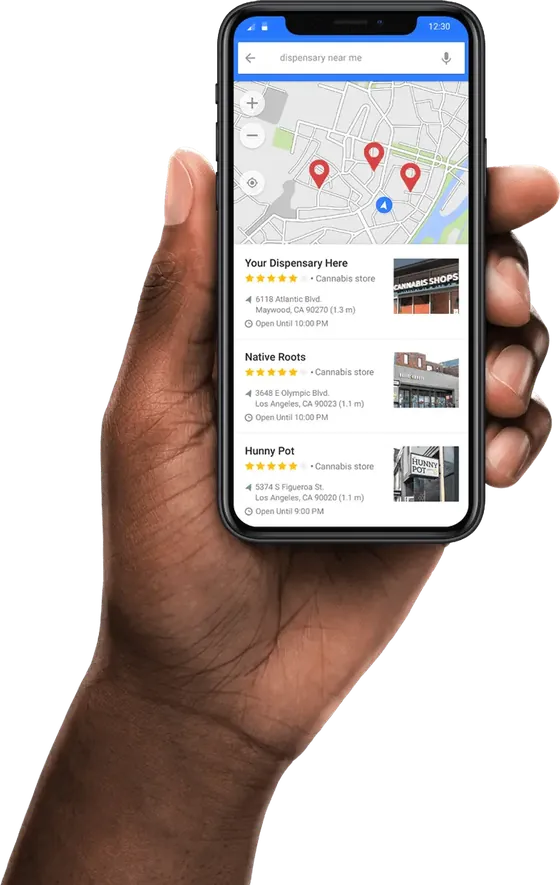
Google local pack for dispensary near me on a phone: a map and three cannabis store listings with ratings, addresses and opening hours.

2. Claim, verify and lock down the profile

Search your store name in Google Maps. If a listing exists, claim it; if it is claimed by a former employee or agency, request ownership through the profile. Verify by whichever method Google offers your profile. Then:

  • Make the licensee's account the primary owner and add staff and your agency as managers. Never leave an agency as owner.
  • Match the name, address and phone exactly to your website footer and your state licence record. No keywords in the business name; that is a suspension risk.
  • Set hours, including holiday hours, and keep them true. Wrong hours produce bad reviews and lost pack positions.
  • Turn on messaging only if someone answers it the same day.

3. Categories and services

The primary category carries most of the relevance signal. For a licensed retailer it is "Cannabis store". Add secondary categories only when they describe what you sell and do: a delivery service category for stores that deliver, and product-line categories where Google offers them. Do not add unrelated categories to widen reach; Google reads the mismatch.

Under services, list what the store does in the customer's words: recreational cannabis, medical cannabis, online ordering, curbside pickup, delivery. Under products, mirror the live menu categories, not individual SKUs that change daily. Fill the attributes Google offers for the category, including accessibility, payment methods and identity attributes the owner chooses to publish.

4. Photos, video and the storefront

Photos are the first thing a searcher taps and a live prominence signal. Shoot the storefront from the street in daylight so a customer recognises it, the entrance, the interior counter, and a handful of product displays that comply with your state's rules on depicting product. Add a logo and a cover image sized to Google's current specs.

Cadence matters more than volume: a few new photos each month tells Google the profile is maintained. Short video of the storefront and parking helps first-time visitors. Google removes photos that show consumption, minors, or content that breaks its policy on regulated goods, and repeated removals put the profile at risk. Keep product imagery to what your state allows in advertising; the rules are summarised in cannabis marketing compliance.

5. Posts, offers and Q&A

Google Posts appear on the profile and in some pack results. One post a week is enough: a new product line, a vendor day, a change of hours, a community event. Offers are allowed as a post type, but cannabis pricing and promotion rules vary by state, so the wording follows your state's advertising rules, not Google's template. Avoid health claims and anything aimed at minors, and never post a deal your state prohibits advertising.

Q&A is public and anyone can answer. Seed it yourself with the questions staff hear at the counter: parking, ID requirements, whether you take cards, medical versus recreational lines, delivery radius. Answer new questions within a day, because a wrong public answer from a stranger stays up until you correct it.

6. Reviews: asking within policy, replying to every one

Reviews feed prominence and conversion. The policy line is simple: ask every customer, never pay for or gate reviews, never ask only the happy ones, and never review your own store. Put the review link on the receipt, in the loyalty confirmation and on the order-confirmation page of your menu. Ask in person at pickup.

Reply to every review, positive and negative, in the store's voice and within a week. A reply to a negative review is written for the next reader, not the reviewer: acknowledge, state what changed, invite them back. Do not mention the purchase details or anything that could identify a medical patient. Flag reviews that break Google's policy (off-topic, conflict of interest, prohibited content) through the profile, and document the flag.

One dispensary GBP optimization mistake is common enough to name. In its 2025 Google Business Profile study of profiles ranking in positions 1–20 across 24 US cities (an agency-run sample, published 2025), SearchLab reported that 60% of dispensaries still had the primary category wrong and 94% had UTM tracking errors on their profile links. Both are ten-minute fixes.

7. Spam and duplicate listings: how to document and report them

Google Business Profile spam around a dispensary takes three forms: duplicate listings for your own store left over from a rebrand or a previous owner, fake listings for delivery services that have no premises, and competitor listings with keyword-stuffed names. Each one takes a pack position that could be yours. The removal procedure:

  • 1. Document. Screenshot the listing, its map pin, its name, address and phone, and the date. Note the policy it breaks: keyword-stuffed name, no physical premises for a storefront category, duplicate of a verified listing, or an unlicensed operator.
  • 2. Report. For a duplicate of your own store, use "Suggest an edit" and mark it as a duplicate, or merge it from within your profile if you can claim it. For a third-party listing, submit a redressal complaint through Google's Business Redressal Complaint Form with your evidence attached.
  • 3. Escalate. If nothing changes in two to three weeks, resubmit with the original case reference, and post in Google's Business Profile community with the evidence. Check whether the listing's licence number exists in your state's public register; an unlicensed listing is the strongest report.
  • 4. Re-check. Put every reported listing in a log with its status, and re-check monthly. Spam comes back; a log makes the second report a two-minute job.

Never report a legitimate competitor out of spite. False reports are visible to Google and hurt the reporter's standing.

8. Measuring the pack

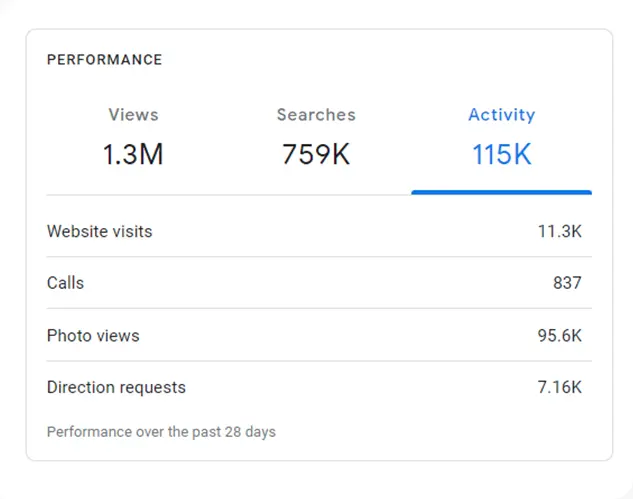
Three numbers say whether the work is landing, and all three come from the profile's own performance report plus a rank grid:

  • Share of Local Voice for "Dispensary Near Me" — measured on a grid of points around the store, monthly, so a rise means the pack is showing you to more of your trade area.
  • Calls and direction requests — the profile's own counts of "Call" and "Directions" taps. Direction requests are the closest measured proxy for a store visit from search.
  • Website and menu clicks — the taps that reach the age-gated menu, tracked with clean UTM parameters so the orders show up in analytics.
Google Business Profile performance report over 28 days: views, searches, activity, website visits, calls, photo views and direction requests, from the NuLeaf NV case page.

The Cannabis Guys, a single storefront in Toronto, is the case that shows the sequence: #1 local search ranking is printed as the client's own metric in the KPI block on its case page. Read the TCG case study.

If you want this run for you every month, the service is dispensary local SEO. It sits inside the wider dispensary SEO plan, and the long-form method is in the dispensary SEO guide.

FAQ

What is the local map pack?

The local map pack is the group of three Google Business Profile listings, shown with a map, that appears above the organic results for searches with local intent such as "dispensary near me". It ranks profiles, not websites, on relevance, distance and prominence, and the three listings change with the searcher's location. For a dispensary it is the most valuable placement on the results page.

How many reviews does a dispensary need to rank?

There is no threshold. Google ranks the pack on relevance, distance and prominence, and reviews are one input to prominence alongside links, citations and profile completeness. A store with fewer reviews but the right category, complete services and a steady review pace can outrank a store with more. Ask every customer, reply to every review, and measure your pack share monthly rather than chasing a number.

Can a dispensary run Google posts and offers?

Yes. Google Posts and Offers are available to a verified cannabis store profile, and a weekly post is a maintained-profile signal. The constraint is your state's advertising rules, which govern what a deal may say, whether prices can be shown and how product may be depicted. Write the post to your state's rules, avoid health claims and anything aimed at minors, and keep the imagery to what your state allows.

What is the 80/20 rule in SEO?

The 80/20 rule in SEO is the observation that a small share of the work produces most of the result. For a dispensary profile, the 20% is the primary category, exact name-address-phone matching, complete services, a monthly photo and a review reply habit. Those items move the pack; the long tail of attributes and post formatting matters less. Do the 20% first and measure before adding more.

About the author

Nick Marx

Nick Marx

Director of Client Relations

Nick Marx is Director of Client Relations at Dispenza. He works with dispensary clients on the listing side of their local search — categories and services, photos and posts, review replies, and the spam reports that clean up a map. If you want your own profile looked at, start a conversation.